
Let’s explore SQL world in this blog post. I will at least try to distill everything into this post 🙂
5 Basic Types of SQL Queries
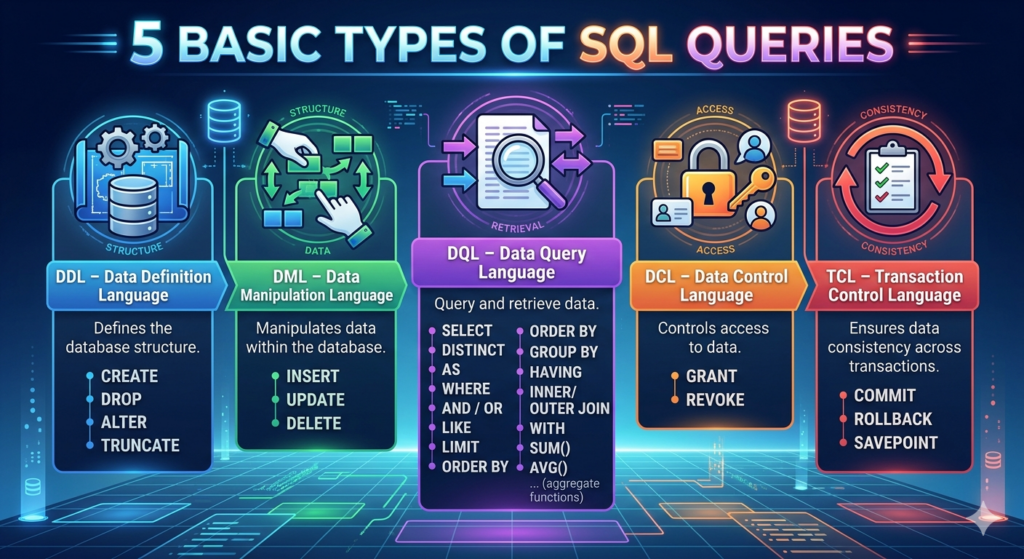
- DDL – Data Definition Language: Collection of commands which defines the database structure.
- CREATE
- DROP
- ALTER
- TRUNCATE
- DML – Data Manipulation Language: Collection of main commands which manipulates data.
- INSERT
- UPDATE
- DELETE
- DQL – Data Query Language: Collection of commands to query and retrieve data.
- SELECT
- DISTINCT
- AS
- WHERE, AND / OR, LIKE,
- LIMIT
- ORDER BY
- GROUP BY, HAVING
- INNER/OUTER JOIN
- WITH
- SUM(), AVG(), … aggregate functions
- DCL – Data Control Language: Collection of commands used for access control.
- GRANT
- REVOKE
- TCL – Transaction Control Language: Collection of commands used to ensure data consistency.
- COMMIT
- ROLLBACK
- SAVEPOINT
About query execution order
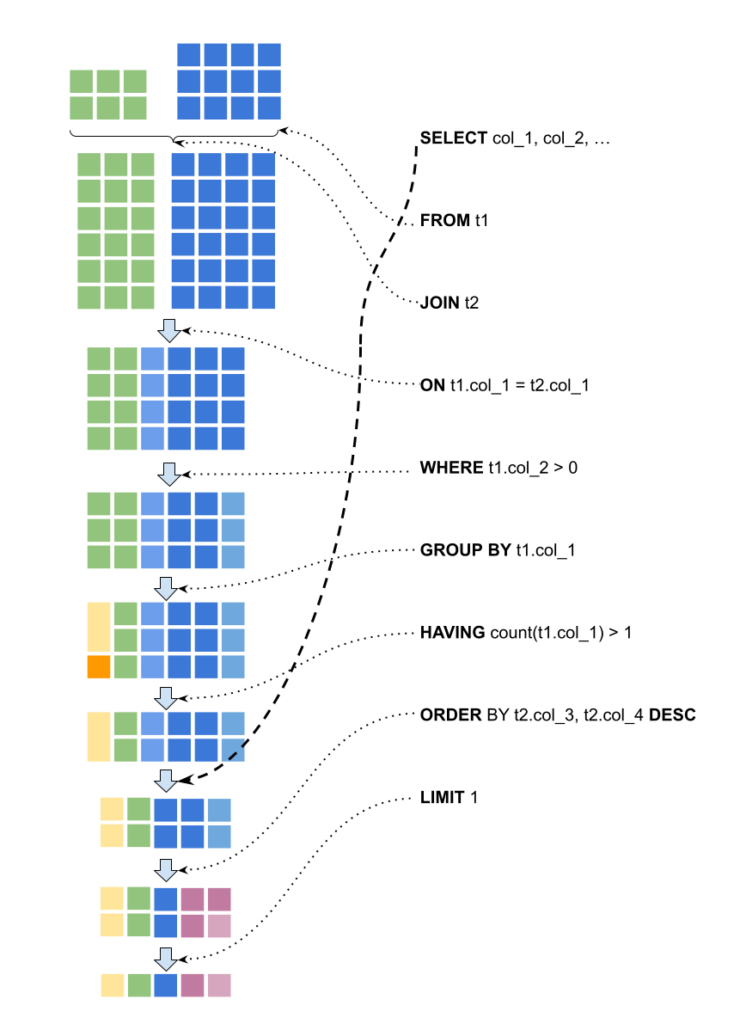
When you write a SQL query, the order you write it is not the order it runs. MySQL follows a fixed logical execution sequence regardless of how you structure the query.
This matters because it explains behavior that otherwise looks confusing, such as why an alias you defined in SELECT is not available in WHERE.
- FROM and JOIN run first. MySQL builds the full working dataset before anything else happens.
- WHERE filters rows from that dataset. This runs before grouping, so you cannot use aggregate functions like SUM() or COUNT() here.
- GROUP BY groups the filtered rows.
- HAVING filters the grouped results. This is why HAVING can use aggregate functions but WHERE cannot.
- SELECT runs after all filtering and grouping. Aliases are defined here, which is why they are not visible in WHERE or HAVING.
- ORDER BY sorts the final result. In MySQL specifically, you can use SELECT aliases here – this is a MySQL extension and not standard SQL behavior.
- LIMIT runs last. It cuts down the already sorted result to the number of rows you specified.
One important thing to keep in mind is that, this is the logical execution order. MySQL’s query optimizer may execute things differently internally for performance reasons, but the final result will always match this logical sequence.
Another important point to note related to above query execution order:
- If a “JOIN” is used without the “ON” condition, it will defaults to a Cross JOIN which produces the cartesian product of two tables. This can produce a huge number of rows if the tables are large.
Let’s understand SQL using a few Queries
Query #1
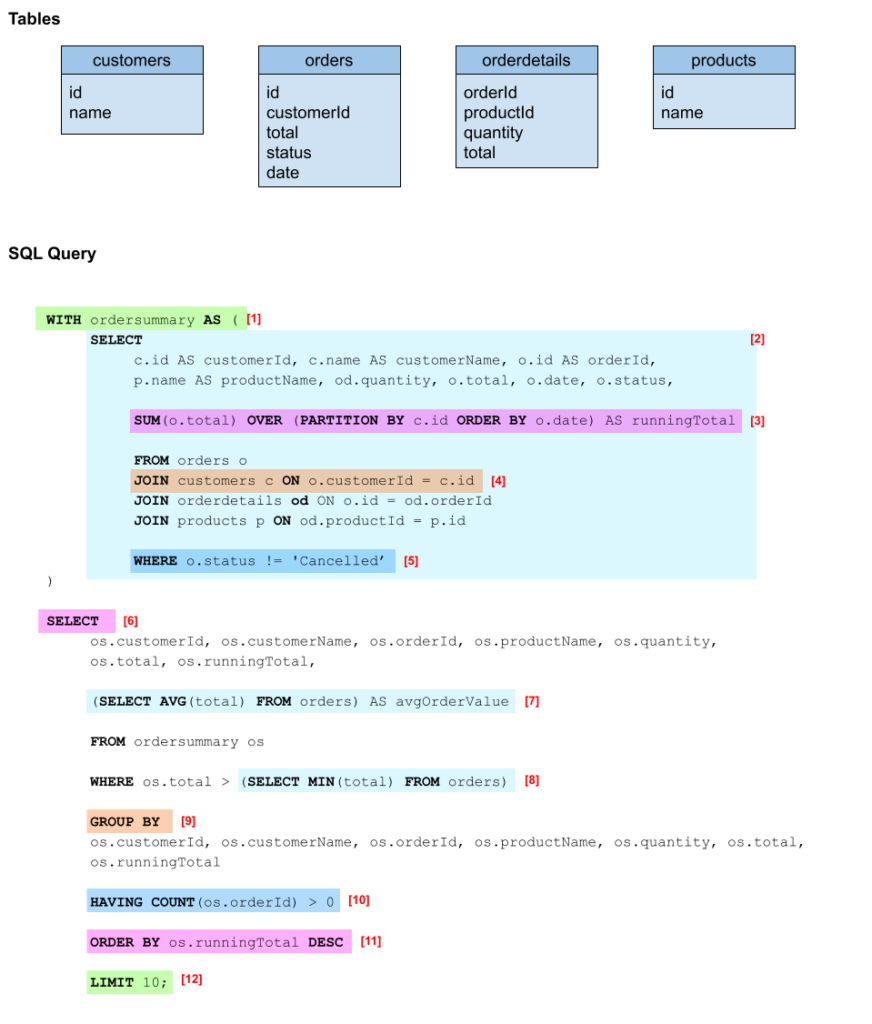
The following single query gives the order details, total amounts, a running total per customer, and average order value all in a structured reference query.
Concepts Used in This Query:
- Common Table Expression (CTE) – WITH ordersummary AS (…)
- A nested SELECT query
- Aggregation – SUM(o.total) OVER (…) AS runningTotal
- Joins – JOIN tb1 ON condition
- Where filtering – WHERE condition
- SELECT query.
- A nested SELECT query used with aggregation
- Nested query is used in filtering
- Grouping – GROUP BY col1, col2, …
- Having Clause affect for Grouped results – HAVING COUNT (os.orderId) > 0
- Sorting – ORDER BY os.runningTotal DESC
- Limiting the final results – LIMIT 1
Query #2
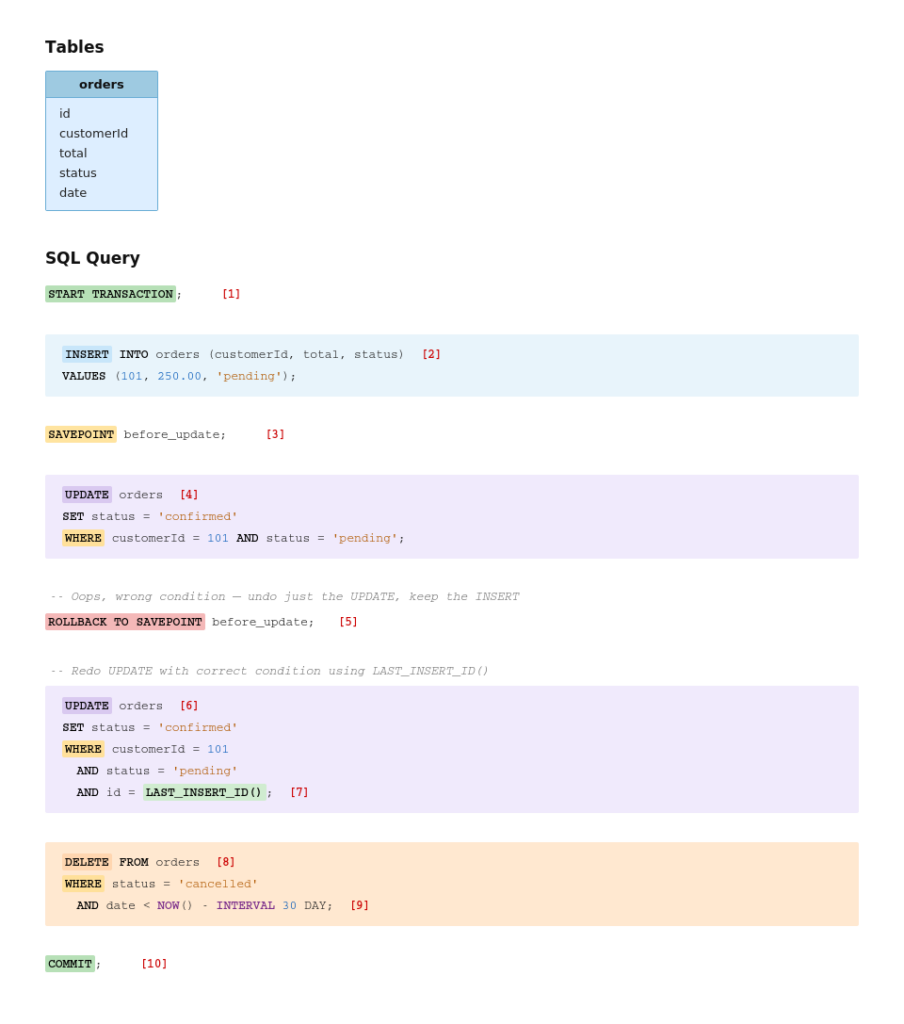
The following query walks you through a data modification scenario. Insert a new order, realize a mistake mid-way, roll back just that part without losing the insert, fix it, clean up old records, and commit everything as one atomic operation.
DML and TCL working together. That’s the point here.
Concepts Used in This Query:
- START TRANSACTION – Begins a transaction. Nothing is saved to the database until you explicitly COMMIT.
- INSERT – Adds a new order row. This is inside the transaction, so it’s not permanent yet.
- SAVEPOINT before_update – Marks a checkpoint inside the transaction. You can roll back to this point without losing everything before it.
- UPDATE – Tries to confirm the order. But this is too broad. No
idfilter, could hit unintended rows. - ROLLBACK TO SAVEPOINT before_update – Undoes the UPDATE, but keeps the INSERT. This is the key difference from a full
ROLLBACK. This is a partial undo. - UPDATE (corrected) – Retries the update with a tighter WHERE condition.
- LAST_INSERT_ID() – Returns the
idof the row inserted in step 3. Pins the UPDATE to exactly that row. - DELETE – Removes stale cancelled orders from the table.
- NOW() – INTERVAL 30 DAY – A date expression.
NOW()is the current timestamp; subtractingINTERVAL 30 DAYgives you a dynamic 30-day cutoff. - COMMIT – Finalises everything: the INSERT, the corrected UPDATE, and the DELETE are now permanently written to the database.
Leave a Reply